 OUR PRODUCTS
Sihema: read, check and simulate CNC programs
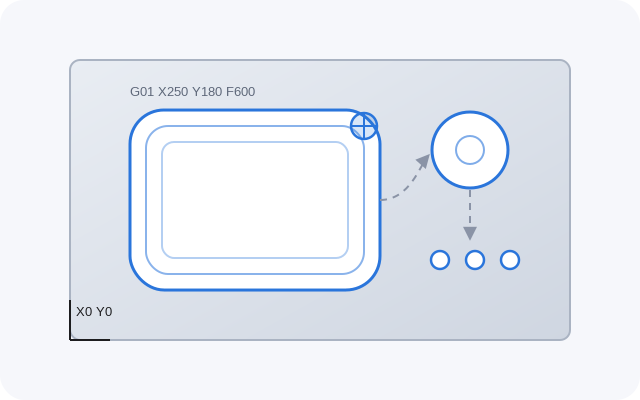
A G-code editor and simulator for the Mac, iPad and iPhone. Open a program, see the path of the tool, compare versions, estimate the cycle time and, before you run it, simulate the cut.
Sihema
CNC editor & simulator. For programmers, operators, school instructors and hobbyists who work with G-code.
Coming soon · Mac, iPad and iPhoneSihema is not released yet. This page describes what it does, and details may change before release.
What is Sihema?
A CNC program is a long list of text lines, and the only way to know what it does is to run it. Sihema reads the program for you and shows what it understands: the path of the tool in 2D and 3D, the tools it uses in order, how long it should take, where it leaves the limits of the machine and what it could not read. You open a file from your control and look before you cut.
It is built for the way shops work: very large files from CAM software, macro programs with variables and loops, subprograms kept in other files, and the cycles of several controls. Everything runs on your device, with no account and no upload.
How it works
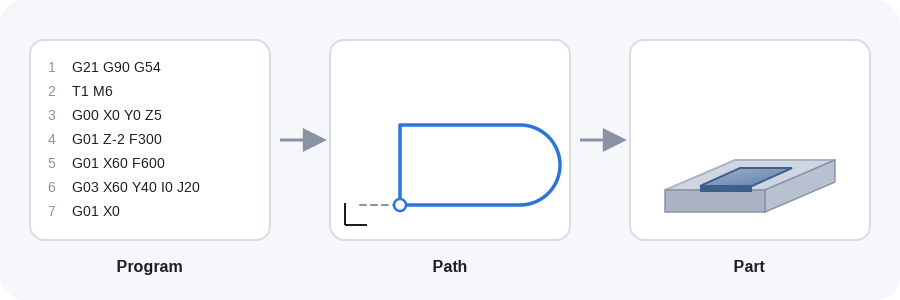
Open
Open a program from your control, from iCloud Drive or from the Files app. A program with millions of lines stays smooth in the editor.
See the path
The Path tab draws the cuts and the fast moves in 2D and 3D. Tap a line to see where it goes, or a point of the path to find its line.
Check
The Report lists the tools, the estimated cycle time, the limits of the axes, and every warning or error with its line number.
Simulate
With Pro, the part is cut from your stock with the real tool size, and the collision check looks at tool, holder and vise.
Send
With Pro, send the program to your machine over FTP, serial or a shared folder, or fetch one back, and print a setup sheet.
What you can do
Standard: edit and check
- Editor with line numbers and colouring for each control
- 2D and 3D toolpath, tied to the line of the program
- Side-by-side compare that ignores formatting-only changes
- Milling and drilling cycles, turning cycles and threading
- Macro programs, subprograms and a project folder for the other files of a job
- Cutter radius compensation and tilted planes
- Cycle time from the acceleration of the machine, and a limit check
Pro: simulate and produce
- Material removal with the real tool size and your stock
- Collision check for tool, holder and vise
- Tool and holder library with real shapes
- Send to the machine over FTP, serial or a shared folder
- Setup sheet as a PDF, and a version history of your programs
- Everything in Standard
Controls and files
Sihema reads G-code written for the most common milling and turning controls: the ISO-style G-code most of them share, conversational (plain-language) programs, and the macro and cycle languages of several controls. It guesses the control from the program, and you can choose one yourself in the app. It opens .nc, .tap, .ngc, .mpf, .spf, .cnc and plain text files, and shows a preview of them in the Finder and the Files app.
Sihema is not made, approved or sponsored by any control or machine maker. Product and company names belong to their owners.
Estimates, not guarantees
Paths, times and simulations are worked out from the text of a program. They are not measured on a machine, and controls and machines differ. Sihema is not a collision-protection or safety system. The operator is responsible for checking a program at the control before running it.
Free trial and one-time purchase
Use everything for 14 days. After that you can still open, view and compare your programs. Standard adds editing and saving; Pro adds the simulation, the tool library, sending to a machine, the setup sheet and the version history. Both are one-time purchases through the App Store, with no subscription, and Standard can be upgraded to Pro for the difference. The prices are shown in the store before you buy, and a purchase works on your Mac, iPad and iPhone. The terms of use explain the details.
Quick facts
| Platform | Mac (macOS 14 or newer), iPad and iPhone (iPadOS and iOS 17 or newer) |
|---|---|
| Availability | Coming soon on the Apple App Store, one purchase for all devices |
| Languages | English, German, Dutch, French and Italian |
| Account | None. Nothing is uploaded. |
| Works offline | Yes, except purchases |
| Support | contact@abderrazaksardi.online |
Questions
Are my programs uploaded?
No. Sihema reads, checks and simulates programs on your device. It has no account, no analytics and no server of its own. A program leaves your device only when you send it to a machine yourself.
Will the simulation match my machine?
Not exactly. Sihema works out paths, times and the cut part from the text of a program. They are estimates. Controls and machines differ, so always check a program at the control before you run it.
Which controls and files does it read?
G-code written for the most common milling and turning controls: the ISO-style G-code most of them share, conversational (plain-language) programs, and the macro programs, subprograms and cycles of several controls. It opens .nc, .tap, .ngc, .mpf, .spf, .cnc and plain text files.
Does it work without a connection?
Yes. Everything except purchases runs on the device. Sending a program to a machine needs the network or serial link of that machine.
How much does it cost?
You can use everything for 14 days. After that you can still open, view and compare programs. Standard (edit and check) and Pro (simulate and produce) are one-time purchases with no subscription, and Standard can be upgraded to Pro for the difference.